Offline Data Maintenance
If you want to do any kind of validation to be done while the scanner is offline this will require data to be downloaded to the device before you take it offline. You allocate permissions to the device as you do with any other device and once that has been done, you need to download data for offline validation.
In the Offline Data Maintenance form, under the Object Name field, only views are supported and visible, not tables.
This means:
- If your Store Procedure references a table, it will not appear in this form.
- If your validation, Decision, Suggestion and Manipulation logic is based on a table, it will also not be accessible here.
To ensure compatibility with offline functionality, always use views as the source for lookups and validations.
Offline Static
When removing data in the Offline Data Maintenance section under Target, ensure that you first remove it under the Scanner Name of your choice before clicking "Select All" to delete data from the Target.
This is important because data for Static entries can be copied across multiple scanners that operate offline under that view. If you don’t remove the data by Scanner Name first, you risk unintentionally deleting data meant for other scanners.

Selecting Offline Data Maintenance
Select to Manage off line data
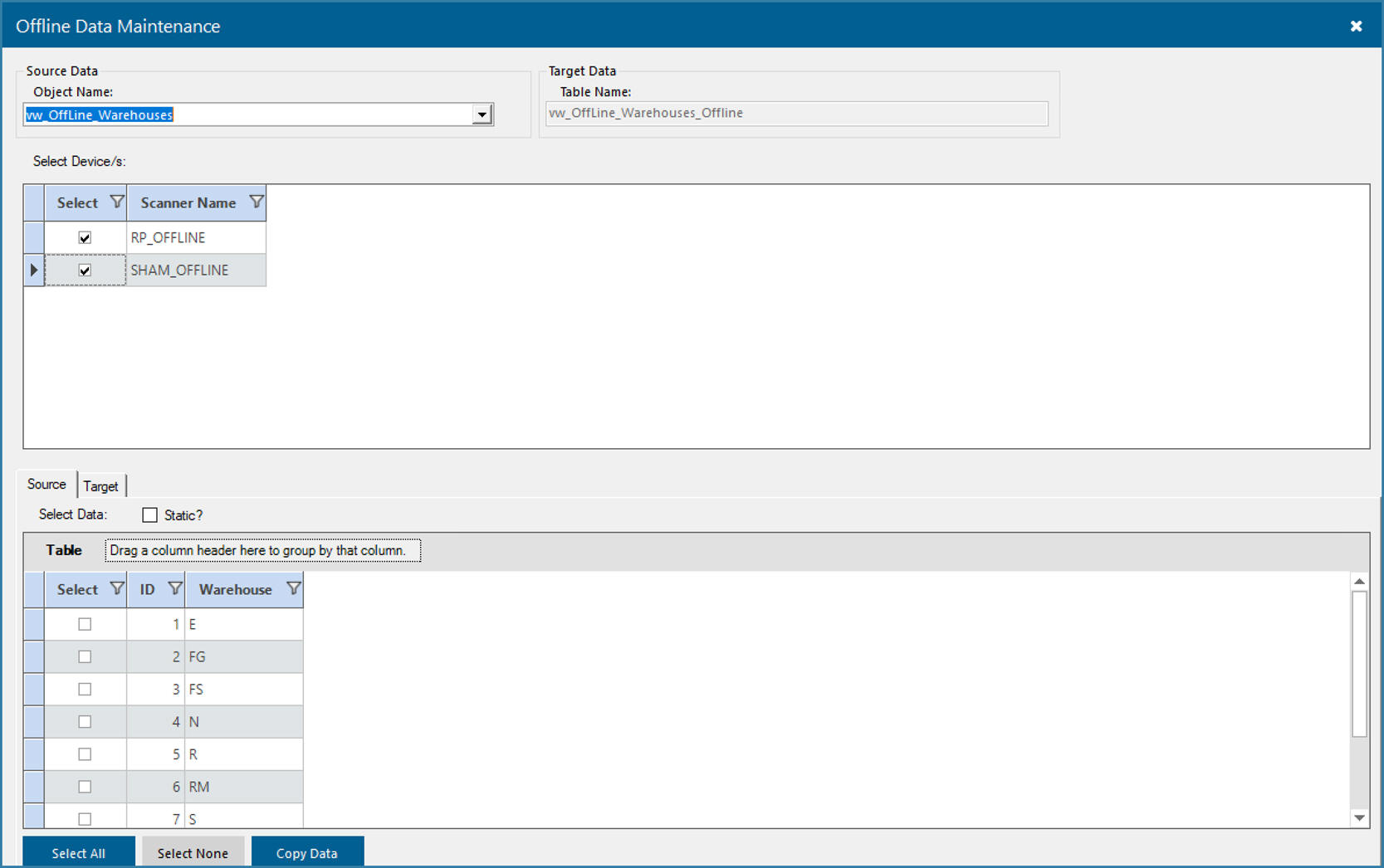
The form to manage offline data is shown above. The Lookup for Object Name will show a list of all views and tables referred to by validations in all function areas allocated to offline devices. The bottom grid then shows all the data in that view or table. The first step is to choose which scanner to send data to - one or many scanners. You would then choose some or all rows from the tables and views and select to copy data.
Note the selection Static?. This is for data that you would like to remain on the device after scanning is completed. Normally validation is cleared off the device when you upload scanned data to the server. If you select data to be static this data would stay on the device even after an upload. Say for example you have a service person that travels to the same 20 or 30 locations each week to service and maintain equipment. If you need them to scan each location as they arrive, this could be static data. You would download the data once and not need to worry about managing it again for download.