Custom Logic Offline
Offline functions support Customs Stored Procedures.
This means the following are available for use:
- Custom Validation
- Custom Manipulation
- Custom Decision
- Custom Suggestion (Suggestion Detail – Stored Procedures)
Important Note:
All stored procedures must use views only to query data. This is because the Offline Data Maintenance form only supports views for copying data to be used offline. If you use a table in your stored procedure to query data, it will not work.
Also, stored procedures cannot be used to insert data into a table in the offline environment. This can only be done using a logdata step.
To ensure your stored procedures work correctly:
- Make sure any views used in the stored procedures are included in the Offline Data Maintenance.
- Ensure the data required by the stored procedure is copied offline via those views.
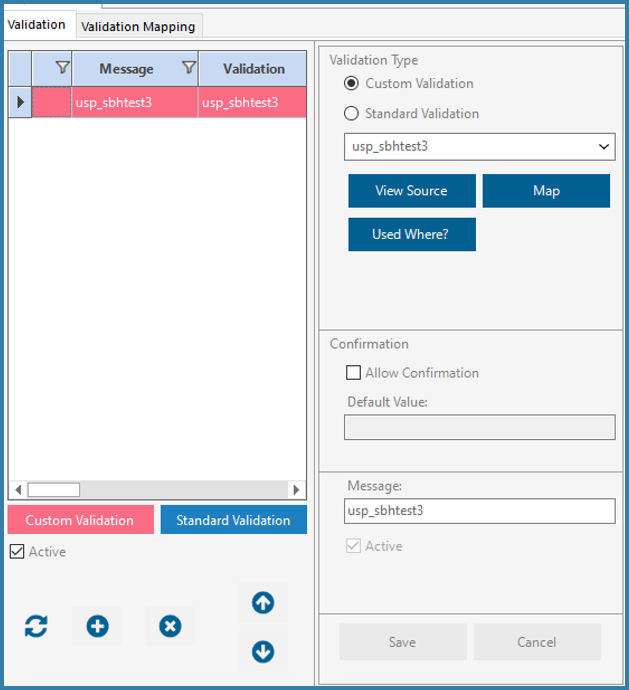
When you select a custom validation and click "View Source", you’ll notice a section labelled "Select Script." as shown below

This dropdown allows you to choose from several sample scripts: Custom Decision, Custom Manipulation, Custom Suggestion, and Custom Validation.

After selecting your preferred custom option from the dropdown list, you can click "View Sample" to preview how a User Defined Function (UDF) can be structured. This sample provides guidance on how to create a UDF specifically for a Custom Decision, Manipulation, Suggestion and Validation.
Example below shows a Custom Decision
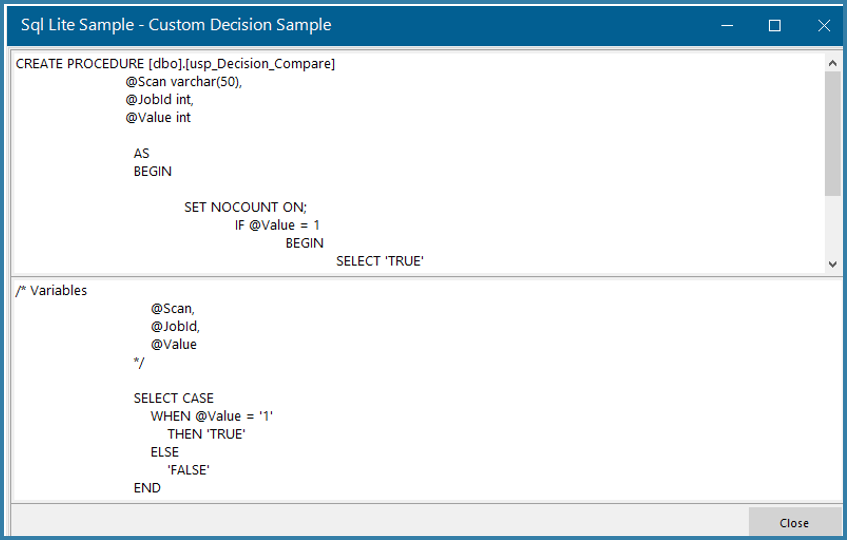
Key features available on the screen include:

- Create UDF: Use this to generate your custom UDF.
Upon clicking 'Create UDF', an object name will be created and displayed in yellow. You will write your UDF script there using the SQLite language. As mentioned earlier, you can refer to the provided sample to guide you in creating the script.
- Check Syntax: Validates your UDF to ensure the syntax is correct.
- Browse: Opens a resource page where you can read more about SQLite and download the latest version if needed.
Important Note:
To enable stored procedure-like functionality in SQLite, a UDF must be created. We've included samples under Custom Decision, Manipulation, Suggestion and Validation to help guide you through this process