Offline Functions
When building functions for offline scanning be sure you have selected off line functions as shown below. There are limitations on what is supported with off line scanning which means that an on line function can not be used on a scanner that is off line. The opposite is however true, an off line function can be used by an on line scanner.
Off line step functions are built just like normal step functions but note that Off Line must be selected as shown below. Also below you will see the reduced list of step type available for off line functions.
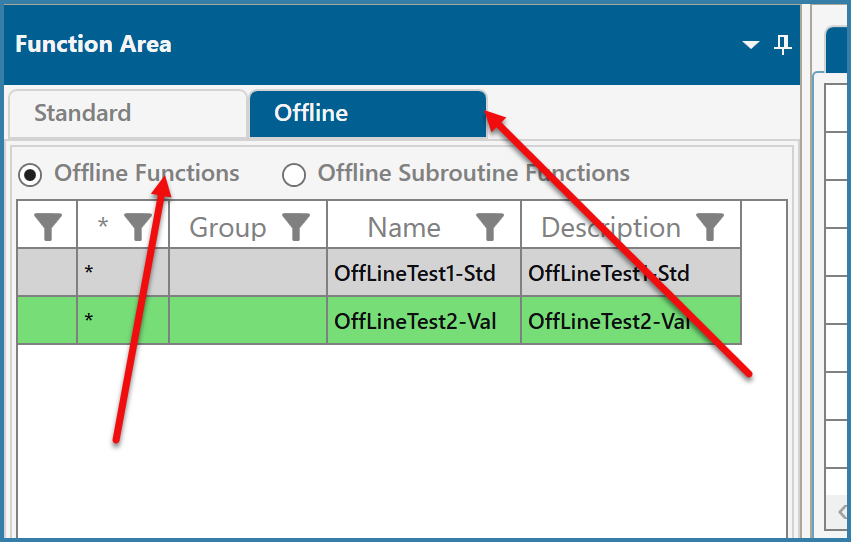
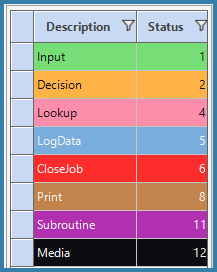
Building Off line functions/ Off line step types
Some of the limitations with off line scanning are:
No grid or overlay functions are supported with off line scanning.
Offline scanning using SQL Lite which has some of its own limitations - Custom Stored Procedures are not support with SQL Lite but we have addedd
support for UDF logic which also allows custom logic to be defined. ISNULL in views is not supported.
You can have input steps with manipulations and validations. Offline functions support custom logic. See here for how to define custom validations, manipulations and decisions offline.
In order to validate Syspro data, you will be required to create a view and then send a subset of the Syspro data to the device for validation. There is no technical reason that you cannot send 5000 sales orders to the device but they will take time to download and will use space on the device that can be used to store scanned data. It is recommended that you think about validation data that is required and send only the data required for the day or shift that the scanner will be off line for.
Log data steps are supported for both Insert and Update options.
Media Steps are supported
Decision Steps are supported but only decisions that do not require Syspro validation are supported. So for example IsSerialised is not supported but DoesDataExist is supported. If you want to base a decision on Syspro data, download the data to a view and use DoesDataExist.
Lookup Steps are suuported and the data required for the lookup must be sent to the device prior to going off line. It is important to note that only views are available for lookups not tables.
We support Lookup View (Standard) and Lookup View (Extended). Lookup List is not supported.
The Close step type is supported
Print Steps are supported but of course nothing will print until the scanner is back on line, the data has been uploaded to the server and the off line data has been processed.
SubRoutines are supported
Full screen errors are supported.
File Create steps are not supported. You can log the data to a table but transferring files from the devices is not supported.
You cannot have a post step in an off line function. In order to post data, use a log step to log data to a table and then set up post from table logic against that table. Data will then be posted to Syspro after the data is uploaded.
EDI Steps are also not supported nor are VBP Steps.
A progress grid is not supported on off line devices nor is the query function.
Log Steps require specific columns in the log table:
As with any log step we need the columns JOB_ID, Scanner and ScanTime
We also need ProcessStatus, OFFLINE_JOB_ID, AUDIT_TIME, OFFLINE_ID, SQLITE_ID